Author: subnetwork

GeekTools: SolarWinds Wireless Heat Maps

Ever changing environments are the biggest problem that wireless engineers face. A new site can be surveyed, and based on that, an ideal wireless design can be created for the space providing perfect signal, overlap, and SNR; the wireless engineer leaves the site, SolarWinds NPM Wireless Heat Mapsmoving on to the next assignment, and that perfect design last through the weekend. Now the engineer is located in a different state, working on a different project, and is getting calls from the customer.
“Hey, we have problems, and I need you to fix them.” the customer says.
“Ok, can you describe the problem for me?” the engineer ask. Secretly, the engineer is shocked the customer is calling for any reason other than to laude the engineers talent, foresight, and general awesomeness.
“None of our customers can connect in the waiting area.” states the customer with disapproval.

Generally, troubleshooting this type of problem is straight forward. A quick look for interferers, a check to ensure all equipment is still functioning, and a general eye for anything that has changed. As a nod to the possibility of a changed environment, a simple question is asked.

“Has anything at the site changed? the engineer queries.
“Of course not” is the answer the customer provides, voice now dripping with disappointment.

Thus, the engineer continues to dig further.

Large enterprise organizations who deploy Cisco hardware generally keep maps for each facility in Cisco Prime. Smaller organizations without the budget or time to assign to Prime can find themselves looking for a different solution.

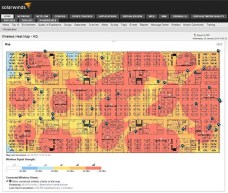
SolarWinds has a new solution that is part of NPM 11.5 and it is worth investigating. They now offer wireless heat maps. The simplicity of setting up the heat maps makes it easy for under-staffed shops to use the tool effectively. Import the floor plan, set scale, and then drag the AP’s supplied by the Cisco WLAN Controller onto the map into the correct locations. Once the AP’s are placed, the software makes a best-guess of wireless coverage. This is a standard but flawed practice.

The issue lies in physical placement of the AP’s within their environment. The AP’s are all at ceiling height, above cube walls, water features, whiteboards, and many other sources of signal degradation. The clients are on a much lower plane, and therefor see a different footprint.

SolarWinds solves this issue by allowing an engineer to place known clients on the map, and then use those to further improve the heat map. This provides a tool that can be used to understand what is happening at standard client heights, where signal matters.

“Oh look, now I see a huge null in the coverage.” the engineer says. “Are you sure there haven’t been any changes near the AP I placed by the receptionist desk?
“Oh, that’s right. We hung the sign this weekend” says the customer.
“That large metal sign that was in the shop area last week?” ask the engineer.
“Yeah, that’s the one, We suspended it from the ceiling right over the receptionist. It looks awesome. That wouldn’t cause this problem would it?”

The engineer proceeds to bang his head against the desk with a dull thud, thud, thud.
*Names have been changed to protect the identities of those responsible*

Watch SolarWinds discussing their wireless heat maps at Network Field Day 9 here: (Heat map discussion starts at 19:40)

-I participated in Network Field Day 9 as a delegate. As part of that participation, the cost of all travel and accommodations were covered. Additionally, some companies chose to give delegates small gifts for their participation. These accommodations do not in any way constitute a requirement for coverage, good or bad. In short, I am an opinionated jerk,  I was invited despite that, and anything I write is purely my own opinion. Special thanks to Tech Field Day, for the service they provide to engineers and vendors. If you would like to be a delegate at a future event, you can learn more here.  

Cisco Live US 2014 – Return to Camp

In May, I made my way to San Francisco for CLUS 2014. I had very fond memories from last year, and was looking forward to catching up with all of the great people that I met in Orlando.

This year was a little different for me. I purchased a full pass, paid for airfare, and my hotel all out of my own pocket. The ultimate question this year was going to be answered. How much is CLUS worth? Is the experience equally important when thousands of dollars come out of my pocket to experience it.

First, the most obvious difference this year was how crowded the experience was. Moscone was simply not big enough for 26,000 people. I recognized on day one, as I was looking for a place to sit for breakfast, that when San Francisco was chosen 5 years ago, the conference was much smaller. Conferences book their locations years in advance, and in this case the attendee base grew faster then they expected.

The large crowds definitely affected the experience. The World of Solutions reception on Monday was so crowded that I spent only 15 minutes there, and the majority of that time was trying to get back out. The crowds also affected the on-site meals. Lunch each day consisted of a boxed meal, breakfast was carb heavy, and the days that I went into the dining hall, it was extremely crowded.

On Thursday, I had an opportunity to talk with Kathleen Mudge, who manages the Social Media Team, and Kathy Doyle, the Director of Cisco Live, about the scale of the conference. Kathy mentioned that there were over 6,000 people who registered for Cisco Live at the conference. That is an incredible 23% of the attendees that could not be accounted for until the first day.

With that in mind, I can’t fault the conference. In-fact, I am surprised that the conference was able to absorb that many people and function at all. That is an amazing feat.

The next few years are in bigger venues, so I expect the conference won’t experience these growing pains again.

The sessions that I attended were all excellent, and allowed me to expand my knowledge in a few key areas that I had identified as needing more work. I didn’t attend as many sessions as I had planned, but that was simply a matter of not having enough time.

As for the social side of CLUS, it was everything I was hoping for. I was able to reconnect with friends made at CLUS 2013, and made many more. The Social Media Hub (which we quickly renamed the Social Media Routed Bridge) was in a great location. Power was easily available for recharging devices. The arrival Tweetup was well attended, and we were able to gather on Thursday for the final picture by the Cisco Live sign.

The Cisco Live Social Media Team at CLUS is always on top of the game. They work incredibly hard to help anyone who ask. They also keep things interesting with various games and prizes. I can’t say enough about the team, and how their work affects the positive experiences of so many attendees.

The parties and the Customer Appreciation Event were all excellent. I was able to participate in three Tech Field Day events, attended the CCIE party again as a non-CCIE, and participated in multiple Cisco Champion events. They were all opportunities to meet more people, and hang out with this huge group of engineers that I get to call friends.

Now for the question. Was attending CLUS on my own dime worth it? If my Cisco Live 2014 experience only included the standard CLUS sessions, the Customer Appreciation Event, and the World of Solutions, I would have to say “no”.

However, Cisco Live is much more than sessions, expo, and parties to attend. Cisco Live is a gathering of people who are passionate about technology and life. Cisco live is space camp, or as Denise Fishburne has begun calling it, simply “Summer Camp”.

Was Cisco Live worth it? Oh yeah. I’ll be back.

Cisco x86 UCS blades overtake HP revenue in the Americas

For the first time, Cisco has overtaken HP in the blade market according to the IDC Worldwide Quarterly Server Tracker. Considering the large market share that HP once UCS Chasisenjoyed, that statistic is surprising. However, when considering the fact that Cisco has only been in the blade market for five years, it becomes absolutely stunning.

Let me state that again, Cisco has overcame the stigma that comes with being the new kid on the block, and shrinking markets, thanks to the heavy push of virtualization, to become the number one vendor of server blades. They did so by growing revenue 39% quarter over quarter in the Americas, a relatively mature market. 

You can read more about their accomplishment here:

http://newsroom.cisco.com/release/1426059

The Internet of Things begins to mature with Apple HomeKit

One statement that I have repeated many times is that the Internet of Things (IoT) will not mature until a non-technical person can buy a myriad of devices and configure them all through a common interface. Apple HomeKit seems to be that interface. There are a few things that I like about the announcement:

  • Apple isn’t going to make outlets, switches, and thermostats. They are leaving that up to the experts. 
  • Apple makes great interfaces, and I believe they are capable of doing the same for Home Automation.
  • The IOS user base is large enough to make this market explode. With an increased user base, comes more products.

Again, if you didn’t read it correctly the first time. This market is about to explode. 

One last thought. Apple started with the user, just like they did with iPhones. How many iPhones are now in our corporate environments? What happens when HomeKit migrates into the office?

Geek Tools – SSH and Telnet on OS X

Since I made the switch to a Mac in my day job, I’ve had two major frustrations. The first is the lack of Visio for OS X. The second one, was a little more major. I needed a replacement for MRemoteNG. I’ve searched for options and grown weary of reading the general post of “why would you need a specialized SSH tool, when it is built into the terminal of OS X?”

That statement is usually offered by a web developer who might have SSH connections to 3-5 servers on a daily basis. They live in a very specific world, and have a hard time understanding anything outside of that world. Feel bad for them; don’t hate them.

In the world of network engineers however, we may connect to 50 or more devices in a day, and may have logins to thousands of devices over an enterprise network. In that environment, there is a real need for the ability to bookmark devices.

After searching for options, I found one option that worked to some extent. This SSH workflow for Alfred is excellent. However, since I use a hosts file from someonewhocares.org to block a lot of advertisers and trackers, the index was never very useful.

After considering this problem from all angles, I finally had an “AH HA!” moment, and the simplicity of the solution made me equal parts giddy and disappointed that it took me so long to resolve. I created a file with a similar layout to a hosts file, in-fact I even named it hosts.txt. Each row of the file list a hostname, and an IP address. Since this file is purely text, you could add anything to each line that you wanted. 

#site1
device1 10.0.1.1 description
device2 10.0.1.2 unique protocol info
device3 10.0.1.3 more information
device4 10.0.1.4
#site2
device1 10.0.2.1
device2 10.0.2.2
device3 10.0.2.3
device4 10.0.2.4
device5 10.0.2.5
#site3
device1 10.0.3.1
#site4
device1 10.0.4.1
device2 10.0.4.2

But how does this help us manage thousands of devices you ask? It doesn’t, but grep does. If we pass a search string to grep along with the file name, all matching hosts show up. Yes it is simple, but it is useful because of that!

In my file, I created a site heading by starting the line with an octothorpe. I use this so that I can search for sites. This looks like:

grep ^# hosts.txt
#site1
#site2
#site3
#site4

I can also search for all devices at a location using a statement like:

grep ^#site2 -A6 hosts.txt
#site2
device1 10.0.2.1
device2 10.0.2.2
device3 10.0.2.3
device4 10.0.2.4
device5 10.0.2.5
#site3

In this case, I am telling it to start at “#site2” and show the next 6 lines. Since the 6th line is the next site, I know that I am seeing all of the devices from site 2.

Finally, if I know part of the hostname, I can simply search on it, and it will display.

Hopefully this gives you a better way of managing huge networks from terminal.

Cisco Live Guest Keynote Speaker Announced – KHAN!!!

Salman Khan was just announced as the Guest Speaker for the Closing Keynote at Cisco Live US. If the name seems familiar, you have probably heard of the Khan Academy.

Picture of Salman Khan of the Khan Academy
Salman Khan of the Khan Academy

The Khan Academy uses technology to create online training which can be used anywhere in the world that has internet available. They have an incredible vision, and the backing to make it happen. I am really excited about hearing Salman speak. In my mind, the Khan Academy is the power of the internet put into practice, I might even call it a redeeming quality. Every time I see a tweet of Justine Bieber’s blowing the internet up, I simply have to remind myself that people like Salman Khan are countering the idiocracy with knowledge.

If you haven’t registered for Cisco Live US yet, now is the time to do so.

Cisco Live US 2014 – Engage Now!

Last year, I attended Cisco Live for the first time in my career. I went expecting to learn a lot, and I was not disappointed. You can read about my experiences here and here. If you haven’t read them, you should read them now. No, really, go read them. 

Now that you have read them, you know that you need to begin planning your social experience now. The scheduler will soon be available, and while you are considering the need of various classes, be certain that you create time slots to meet people. There is an incredible braintrust available in the social media hub. If you take the time to mingle and discuss you will be surprised at what you will learn.

I have long been a proponent of Twitter for IT professionals. If you and I have met over the last few years, and I haven’t asked about your social media interaction, I would question whether you actually met me and not a doppelgänger. If you have actually met me, I hope that my influence, no matter how small, pushed you to engage.

If you are new to social media and planning on hanging out in the Social Media Hub, let me offer a few suggestions.

  • Engage now. Don’t expect to show up to the social media hub without ever talking to any other engineer on twitter and expect to enjoy your experience. We like our jokes, our running discussions (arguments), and interacting. The social media hub is our opportunity to continue our online discussions in person. If you want a great list of engineers to follow, just check out who I follow.
  • Don’t be afraid to ask questions. We all come from a different background. Some of us are jack-of-all-trades, some of us specialize. We don’t expect anyone to be an expert in everything. We enjoy learning from each other. If you listen, and ask questions, you will learn.
  • Leave the oversized ego at home. Most of us have bigger personalities than egos. There are people in this group who know more than you. Trust me on this! If you show up with the goal of proving how smart you are, you’re going to have a bad time.
  • Don’t worship at the feet of your favorite author/personality. Yes, they will hang out with us and yes, they know an incredible amount about certain topics. Without exception though, they don’t want to be placed on a juvenile pedestal. They want to engage with other engineers. Story time:

Last year, I started a conversation with a well known author. We talked about our careers, about IT in general and the direction of technology. During these conversations, no less than 15 people approached to tell the author how great he was. The author was very happy to talk with them, and many times tried to draw the individual into our conversation. He would introduce me, mention the topic we were discussing at the moment, and made a genuine attempt to engage them in the discussion. Without fail, they thanked the author for his work, and then shyly withdrew. They were worshiping, not engaging.

  • Finally, register NOW! Register now to be certain you can attend the session that you want or need. This will also ensure that you can get an exam registered before all of the slots are filled. You can register here:

Cisco Live Registration

Geek Toys – Jabra Motion UC

Last week, I reviewed the Jabra Speak 450, which was provided by Jabra for a review.

Jabra Motion UC
Jabra Motion UC

This week, brings a review of the Jabra Motion UC. You will notice there is no disclaimer this week, as my Jabra Motion UC was supplied by my employer for testing, not by Jabra directly.

The obvious question is, why am I reviewing a product, when I have no obligation to do so? The answer is simple, because I REALLY like this bluetooth headset.

The model that I received included a dock/case, Jabra Link 360, and charging cable. The dock/case is quite ingenious, making it easy to store and travel with all of the accessories, while also providing a dock when at your desk. The case has traveled with me for a couple of trips, and has held up extremely well.

Battery Life

My average Tuesday is packed with meetings. I regularly have 8-10 meetings in a single day, all of them via phone, Lync, or Webex. With this schedule, the only time the headset goes into the charger is during lunch. The specs report 7 hours of talk time. While I have never tracked talk-time for a charge cycle, I have never found myself without battery.

Audio Quality

The loudness and clarity of the headset is very good. The noise rejection is also very good. The headset has two mics, which are back-to-back. With this setup, one mic is always used to pickup voice, the other is used for noise identification and isolation.

Comfort

The headset fits behind and over the ear. Its fit and weight make it very comfortable. Once I adjusted to the fact that it never felt tight on my ear, I was suprised by how well it held on. Short of head banging to an 80’s hairband, its going to stay with you.

Improvement Needed

There are two things that I would like to see improvement in. The first is the way the headset is switched from ear to ear. The process requires spinning the rubber earpiece on it’s mounting surface. This isn’t easy to describe, and it isn’t easy to do. The second issue has to do with the volume control. The touch control sometimes requires multiple swipes before it responds; other times, a simple bump is all that is required.

Wrap-Up

Despite the two areas that I would like to see improvement in, this is the best bluetooth headset that I have owned out of nearly a dozen units. It is comfortable, the battery last long enough for an entire day, and the range is exceptional. Ultimately, if I were to leave my current employer tomorrow, I would buy a Jabra Motion UC.

Geek Toys – Jabra Speak 450 for Cisco

Jabra Speak 450
Jabra Speak 450

First, a confession. This review is WAY overdue. I have been slammed at work recently, and that has carried well over into my evenings and weekends. The good thing about being busy with my company is that it usually involves travel. When trying to review a Bluetooth speakerphone, travel is exactly what you need.

I received the Speak 450 from Jabra to review in early August. Since that time, I have tested it in quiet environments, in loud noisy construction zones, and in a couple of airports. The device is branded Cisco, so there is no doubt which products it should work well with. However, I tested it with Cisco IP Communicator, Skype, and Microsoft Lync, and found all three to function similarly well.

The design screams “Cisco”. While the Speak 450 comes in two colors, I received a grey device that matches Cisco endpoints well. The angled speaker directs sounds towards the user, and the large buttons responded as expected. The unit I received included a Jabra Link 360 bluetooth adapter. I tested with the adapter, and with standard bluetooth connectivity. Test systems included two MacBook Pro’s (2010 and 2013), a Windows 7 laptop (with Link 360 adapter), an iPad and an iPhone.

Battery Life

One of the most important aspects of a battery powered speaker is runtime. The spec sheet list a 15 hour battery life. I found this to be closer to 12 hours from my use. While that is a considerable difference, I honestly had to work to keep from accidentally charging it before running it down. Also, a great feature of the device is the ability to plug into your computer via USB, working even on a dead (recharging) battery. With this ability, I don’t think it is possible to be caught in a situation where the Speak 450 cannot be used.

Sound Quality

The sound quality of this device is very good. The speaker puts out a good volume level without distorting excessively. Users always stated that they could hear me clearly.

The secret to the microphone quality is the location of the microphone. It is located low and center on the device. It is designed to pick up audio that is bouncing off a table, or other hard surface. The spec sheet list a 120 degree coverage area, which means it rejects most unwanted room noise. This was key when working in an office that was in the middle of construction. As long as I had the speaker between me and the construction noise, so that the mic was pointing away from the source of noise, users couldn’t hear the sander, hammer drill or air compressor. This great sound rejection comes at a cost however.

My only complaint about the Speak 450 is that it can only be used by a max of 3 people. The coverage area fits three people OK as long as they are sitting around a table, relatively close together. When a fourth person is added to the mix, they are going to feel frustrated. The speaker points away from them, making it harder to understand, and they will be asked to repeat themselves regularly. If you are looking for a conference room mic for a standard 6-8 seat room, this isn’t it.

Wrap-Up

The Speak 450 from Jabra is well built, able to handle travel in a backpack without issue, provides very good audio quality and noise rejection, and has excellent battery life. While not ideal for large meetings, it is capable of handling 3 active participants with very good results. Would I buy it? Yes.

***Disclaimer – I received a Speak 450 from Jabra to review for this article. Jabra has asked for my opinion only. This post is entirely my opinion, without inference or editing by Jabra.***

Geek Tools – OpenGear ACM5004 Console Servers

While I was at Cisco Live, I was invited to sit in on a Tech Field Day event with OpenGear. This was my first Tech Field Day, and hopefully not my last. You can see the full video here: http://techfieldday.com/event/clus13/

Additionally, you can see a great blog post, written by Bob McCouch,
about the event here:
http://herdingpackets.net/2013/07/13/openly-passionate/

and Blake Krone’s take on the event here:
http://blakekrone.com/2013/07/09/one-console-to-rule-them-all

In short, OpenGear did a awesome job presenting a new product, the IM7200. They asked us about use cases, answered all of our questions, and impressed quite a few of us in the room.

After the event, I ended up speaking with their team about a couple of ideas that I had for their product. Based on that conversation, they were nice enough to make a unit available for testing. I received it a couple of weeks after Cisco Live, set it up on my network, and began playing.

For the past three to four weeks, I have been using the console server on my network, and trying to figure out what I wanted to write about it. I’ve started this post at least three different times, and each time scrapped the post after an hour of work. Why was it so hard to write about you ask?

Because this is one loaded device! This thing has EVERYTHING you could want on your network.

WHAT IS GOOD?
-RJ45 ports for connecting to console ports. No special cables, no adapters in most cases, no rollover cables. Plug one end of a straight-through cable into the console sever, and the other end into the console port of a switch or router, and away you go.
-In addition to standard console ports, the ports can be configured in a number of various ways. This should allow for connection to almost any device in your network.
-SSH, Telnet, FTP, TFTP, HTTP, HTTPS, DHCP, NTP, SNMP, DNS Server/Relay, and the list goes on.
-Once you have devices connected, you can access them various ways. SSH, Telnet, no surprises, right? How about a web terminal? Yes, it is that awesome.
-I/0 ports. These ports can be sensed (door sensors, environmental monitoring, etc) or set (activate a relay to release a door.) Imagine with me working on a remote site, you ask the user on the phone to walk over to the door. You unlock the door for them, and see when the door is ajar. You ask them to complete your task, and then to close the door. Does the user close the door, or hang out and play in your IDF? Well, now you know.
-USB Port. The usb port can be used for flash storage, or it can be used to connect to devices which only support USB console devices.
-Easy to set firewall rules. Do you only want SSH allowable outside of the trusted network? No problem. Settings are made with a checkbox.

I could keep going. I could mention the IPSec, OpenVPN, and DDNS options…but I won’t.

WHAT COULD USE WORK?
My gripes are pretty small with this device.
-The documentation and product CD push additional software (SDT Connector) for creating connections. Really, I don’t see the purpose. Connections to the ports are easily made over SSH (or Telnet if you like living on the edge) by specifing the correct tcp port; 300X for SSH and 200X for telnet, where X is the console port number.
-Because this device has SO MANY OPTIONS, I think some default options would make setup faster and easier. If you could select a group of ports and assign a Cisco Console Profile to them, and choose another group and assign a APC Environmental Monitoring Profile to those, setup would go much easier.

Ultimately, what you need to know is that this device is a Linux server. It is capable of doing anything that a small Linux server can do. What makes this such a compelling product is that Opengear has packaged all of the daemons and services that can be used in a network into a single simple to use form-factor. Let’s face it, we spend our day configuring complex network services. Our network and device management shouldn’t be
difficult.

This isn’t the last that you will hear about my impressions with the Opengear ACM5004. I’m currently working on a use-case at work which I will write up in the near future. If you have any questions, let me know in the comments.

***Opengear provided an ACM5004 for this review. No other services or payment were received.***